
Getting started
How CreateWebToday works
What you get, what to have ready, and what the whole journey looks like.
What you get
CreateWebToday builds your business website with artificial intelligence, from whatever you tell it. There are no templates to fill in and no technical knowledge required: you describe your business, upload a few photos, and minutes later you have a complete page.
- Your professional website, written and designed for your trade and your city.
- Your own domain (for example
yourbusiness.com), included for as long as your plan is active. - Hosting and an SSL certificate, already set up. Nothing else to hire.
- A visual editor so you can change text and images yourself, any time, without using up any credits.
- Email on your domain (for example
[email protected]) when we register the domain for you.
What to have ready
Gather these four things before you start. With them, the wizard takes about ten minutes.
- Your business name, exactly as you want it displayed.
- A description: what you sell or what service you provide, the area you cover, what makes you different. It doesn't have to be well written — copy and paste from your Facebook page or your Google listing.
- A WhatsApp number or a phone number. One is enough.
- At least 2 photos (3 or more recommended): your premises, your products, your team, finished work.
What the whole journey looks like
Four stages. The first two are free and with no commitment: you see your finished page before deciding whether to pay.
1 · Tell us about your business
A four-step wizard: title and trade, your business story, how customers reach you, and your photos.
2 · Pick from 12 designs
The AI proposes 12 different designs made for your business, split into two rounds of 6. You pick your favourite.
3 · See your finished page
With the chosen design, your complete page is generated using your own text and photos. You review all of it before paying anything.
4 · Choose a domain, a plan, and publish
Search for the domain you want (or use one you already own), pick a plan, pay, and your page goes live.
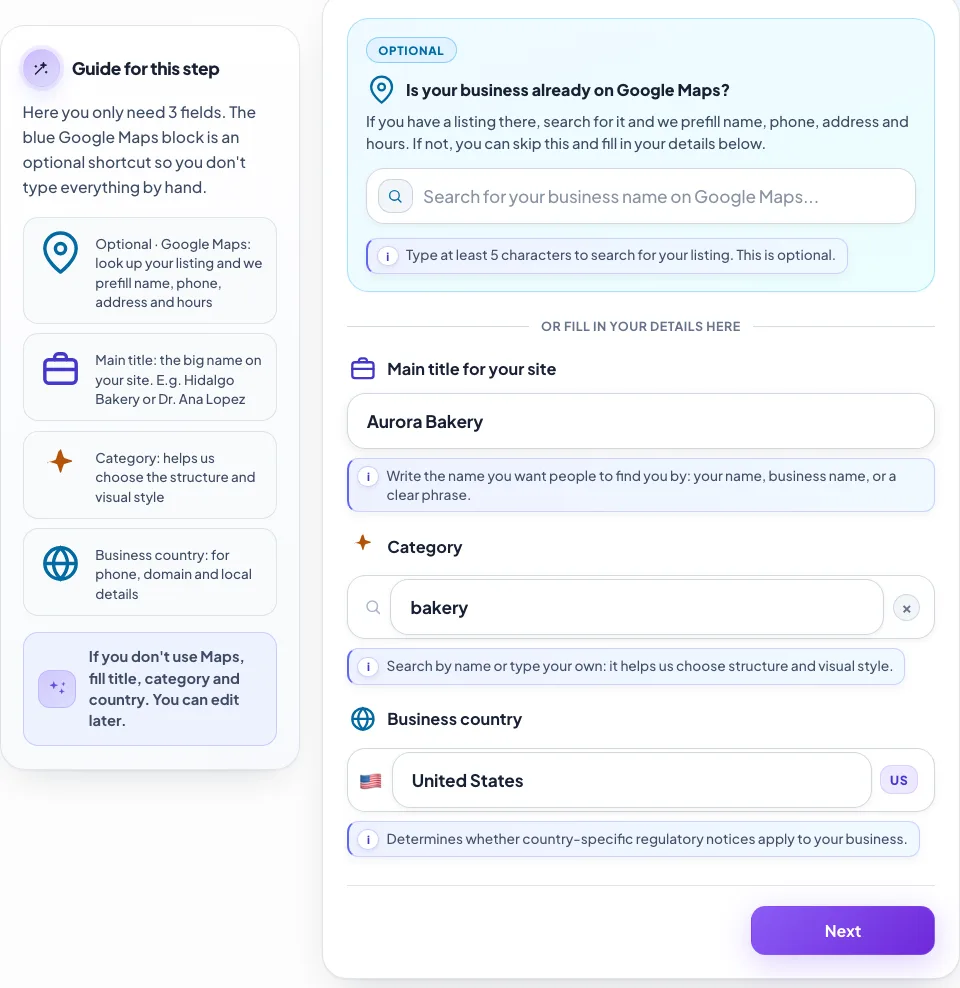
- 1Optional shortcut: find your Google Maps listing and we'll fill in name, phone, address and hours for you.
- 2Main title: the big name on your page. E.g. “Aurora Bakery” or “Dr. Ana Lopez”.
- 3Trade or category: it drives the structure and the visual style the AI will propose.
- 4Business country: sets the phone format and local details.
How long it takes
Filling in the wizard takes about ten minutes. Generating the 12 designs takes a few minutes more, and building the page from the chosen design about the same. Most businesses see their finished page the same day they start.
When you pay
Creating your page and seeing your 12 designs costs nothing, and we don't ask for a card. You only pay once you've seen your finished page and decide to publish it with your domain. Your price is locked to the plan you choose that day.