
CreateWebToday logo
CreateWebToday.com
How it worksPricing
Log inCreate my site for freeCreate free
CreateWebToday logo
CreateWebToday.com

What most people look for

  • Published pagesSee how yours can look→
  • Design stylesHow yours can look→
  • How it worksThree steps, ready today→
  • PricingOne clear plan, everything included→

Learn more

  • Everything includedDomain, hosting, SSL and editor→
  • Who it's forLocal businesses and professionals→
  • CompareVs. an agency or doing it yourself→
  • Why a websiteWhat your business gains by having one→
  • FAQAnswers before you decide→
  • Help centerStep-by-step illustrated guides→

Account

  • Log inAccess your account→
Create my site for free

Build free, no card · From $29/mo when you publish

  1. Home
  2. Help center
  3. Your page metrics
TopicsMetrics
Start here

Before you start

Getting started

Create and publish your site

1Create your page2Choose your design3Choose your domain4Choose your plan5Pay and publish

Editing your site

Your dashboardEdit textChange imagesEdit with AIVersions and publishingChange the designSEOMetricsMy siteMy business

Topics

Start here

Before you start

Getting started

Create and publish your site

1Create your page2Choose your design3Choose your domain4Choose your plan5Pay and publish

Editing your site

Your dashboardEdit textChange imagesEdit with AIVersions and publishingChange the designSEOMetricsMy siteMy business

Can't find what you're looking for?

Write to us and we'll reply during business hours.

Go to support

Metrics

Your page metrics

Visits, unique visitors and WhatsApp clicks, once your site is published.

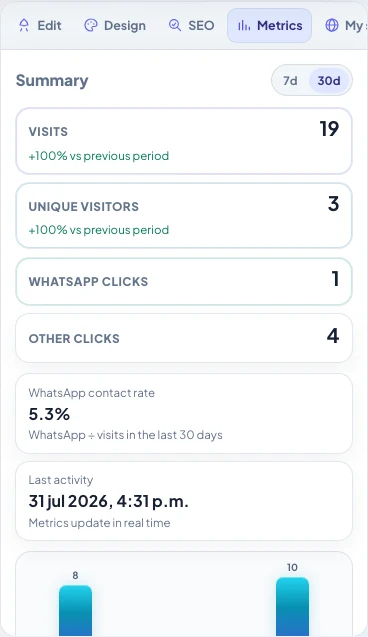
The Metrics tab shows how many people reach your site and whether they get in touch. It only appears once you have a published version: while it's a draft there's nothing to count.
createwebtoday.com/dashboard
Metrics tab: 30-day summary, visits, unique visitors and WhatsApp clicks123
  1. 1Pick 7 or 30 days. The comparison below is against the previous period.
  2. 2Visits (every time someone opens the page) and unique visitors (distinct people).
  3. 3WhatsApp clicks and the contact rate: how many visits ended up writing to you.

What each number means

  • Visits — every time someone opens your page.
  • Unique visitors — distinct people per day.
  • WhatsApp clicks — taps on the button or the wa.me link.
  • Other clicks — phone, email, map and the rest of the buttons.
  • Contact rate — WhatsApp divided by visits in the period. That's the figure that best tells you whether the page is doing its job.

Switch between 7 days and 30 days at the top; the comparison is against the previous period. Below there's a chart per day. Metrics update in real time: no need to reload.

If it's all zeros

Share the published link (your domain or createwebtoday.com/published/…) and open it yourself from your phone. Within a few minutes the first visit should appear, and if you try the button, the click too.

Updated August 2026

Next topicMy site: domain and publishing
Webi, the CreateWebToday mascot
CreateWebToday.com

Your professional website, ready today — in a single link.

Product

  • Pricing
  • Create my site for free
  • Log in

Legal

  • Terms and Conditions
  • Privacy Notice
  • Cookie Policy

Support

  • Help center
  • Support
  • FAQ
  • admin@createwebtoday.com

Españolcreatuwebhoy.com

© 2026 CreateWebToday. All rights reserved.

Prices in USD · No hidden fees · Email support in English.